
What Are Text Features? A Parent's Guide to Nonfiction Reading
March 30, 2026
If your child has ever come home with a science or social studies assignment and you've heard them say something like "I need to find the text features" — and you thought, "The what now?" — you're in good company. Text features aren't something most of us talked about when we were in school, even though we used them every single day without thinking about it.
Text features are the parts of a nonfiction book or article that aren't the main body of writing — things like headings, bold words, captions under photos, diagrams, glossaries, and indexes. They're the built-in tools that help a reader find, understand, and organize information. Today's teachers spend real instructional time helping students notice and use these features on purpose, and that means your child's homework might ask them to do things like "identify the text features on page 12" or "explain how the diagram helps you understand the main idea." Once you know what teachers mean by "text features," you'll see them everywhere — because you already use them every day.
What Are Text Features?
Text features are any elements in a nonfiction text that are separate from the main body paragraphs and are designed to help the reader navigate, locate, or better understand the information. They include things like titles, headings, subheadings, bold or italicized words, captions, labels, diagrams, charts, maps, tables, glossaries, indexes, and tables of contents. Think of them as the "road signs" of a nonfiction text — they tell you where you are, what's important, and where to find what you need.
Why Do Teachers Use Text Features?
When most of us were in school, reading class was mostly about stories. We read novels, short stories, and the occasional poem. Nonfiction — if it showed up at all — was something you dealt with in science or social studies, and nobody really taught you how to read it differently from fiction.
That's changed significantly. Today's standards call for students to spend roughly half their reading time on informational text by third grade, and the proportion keeps growing through middle school. Teachers now explicitly teach students how nonfiction works differently from fiction — and text features are a huge part of that.
Here's the reasoning: fiction is designed to be read from beginning to end. Nonfiction usually isn't. When you pick up a nonfiction book about volcanoes, you might need to find one specific fact, compare data in a chart, or jump to the chapter that covers what you're researching. Text features are what make that possible. By teaching students to recognize and use text features, teachers are giving them a transferable skill they'll use in every subject — from reading a science textbook to navigating a website to scanning a recipe.
The shift isn't about replacing story-reading with dry informational text. It's about making sure students know how to handle both kinds of reading, because the real world demands both.
Stuck on tonight's homework?
Paste in the problem and get a step-by-step explanation in your child's grade level — using the same method their teacher uses.
Try 3 Questions Free — No Signup RequiredWhat Grade Are Text Features Taught?
Text features show up across the entire K–8 span, with the complexity increasing at each level.
Kindergarten & 1st Grade
Students begin noticing basic text features in simple informational books — things like the title, photographs, labels, and the difference between pictures with captions and illustrations in a storybook. A typical assignment might ask a kindergartner to point to the title of a book or describe what a photograph shows. In kindergarten (RI.K.5), the standard focuses on identifying the front cover, back cover, and title page. By first grade (RI.1.5), students are expected to know and use text features like headings, tables of contents, and glossaries to find key information.
2nd & 3rd Grade
This is when text features instruction really takes off. Second graders are expected to "know and use various text features (e.g., captions, bold print, subheadings, glossaries, indexes, electronic menus, icons) to locate key facts or information in a text efficiently" (Common Core RI.2.5). By third grade, students expand to search tools like keywords, sidebars, and hyperlinks (RI.3.5). Homework at this level might ask your child to use the index to find a specific topic or explain why the author put certain words in bold.
4th & 5th Grade
The focus shifts from identifying text features to analyzing text structure — how the author organized the whole piece. Fourth graders learn to describe overall structures like chronology, comparison, cause/effect, and problem/solution (RI.4.5). Fifth graders compare and contrast the structure of two or more texts. At this stage, your child might be asked not just "what text features do you see?" but "how does this heading help you predict what the section is about?" or "why did the author include this diagram instead of just describing it in words?"
Grades 6–8
Middle schoolers analyze how specific text features and structures contribute to the development of ideas. They evaluate whether the structure an author chose is effective, analyze how a particular sentence or section fits into the overall structure, and consider how the form of a text (article vs. infographic vs. documentary transcript) shapes its meaning. Assignments might ask them to compare how two articles about the same event use different structures and text features to emphasize different aspects.
If your child is working with text features at any of these stages, it's developmentally appropriate and part of a deliberate progression from "I can find the glossary" to "I can evaluate whether this author's organizational choices are effective."
How Text Features Work
Let's walk through the most common text features your child will encounter, with examples of how teachers ask students to use them.
Using Headings and Subheadings (Grades 2–3)
Imagine your child is reading a nonfiction article about ocean animals. The article has the following structure:
Title: Ocean Animals
- Heading: Animals Near the Surface
- Subheading: Dolphins
- Subheading: Sea Turtles
- Heading: Animals in the Deep Ocean
- Subheading: Anglerfish
- Subheading: Giant Squid
A teacher might ask: "If you want to learn about sea turtles, which section would you look in?"
The student uses the headings and subheadings to navigate directly to the right section — just like you'd use chapter titles in a cookbook to jump straight to "Desserts" instead of reading the whole book.
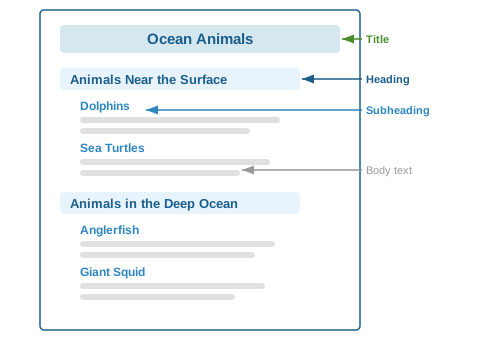 Diagram of a nonfiction page showing headings, subheadings, and body text with labels pointing to each text feature
The heading tells the reader what a whole section is about. The subheading breaks that section into smaller topics. Teaching kids to read headings before diving into the paragraphs is like teaching them to look at a map before starting a road trip — it gives them a sense of where they're going.
Bold Words and the Glossary (Grades 2–3)
Your child's science book has a paragraph like this:
The outer layer of the Earth is called the crust. Below the crust is a thick layer of hot rock called the mantle. At the very center is the core, which is made of extremely hot metal.
The bold words signal: these are important vocabulary terms. Most nonfiction books for this age include a glossary at the back — an alphabetical list of those bold terms with their definitions.
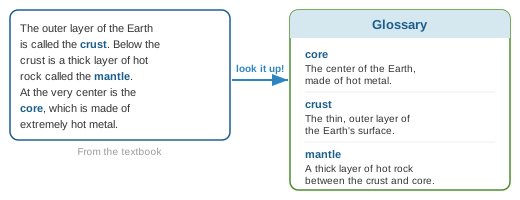 Diagram showing a bold word in text connected by an arrow to its definition in a glossary at the back of the book
A teacher might ask: "Find the word 'mantle' in the glossary. How does the glossary definition help you understand what you read?" The student learns that bold words are the author's way of saying "this word is important — and if you don't know it, I've defined it for you in the back."
Captions and Diagrams (Grades 3–5)
Your child's textbook has a photograph of a volcano erupting, with this caption underneath:
Mount St. Helens erupted on May 18, 1980. The eruption sent ash and rock more than 15 miles into the sky.
Next to it is a labeled diagram showing a cross-section of a volcano with arrows pointing to the magma chamber, vent, crater, and ash cloud.
A teacher might ask: "What information does the caption give you that the main text doesn't?" or "How does the diagram help you understand how a volcano works better than just reading about it?"
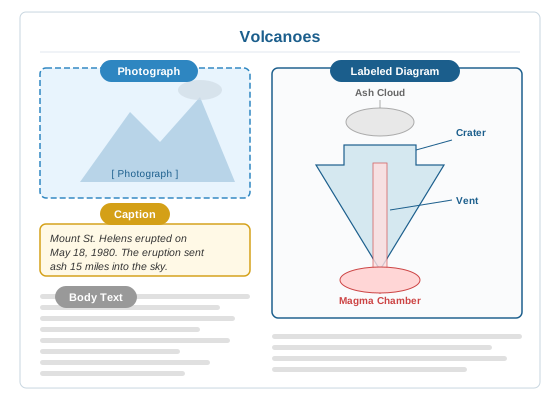 Labeled diagram of a nonfiction page layout showing a photo with caption below and a labeled diagram beside it
This is where text features go beyond navigation and into comprehension. The caption adds specific facts (the date, the measurement). The diagram shows spatial relationships that would take a full paragraph to describe in words. Students learn that text features aren't decoration — they carry real information that sometimes isn't in the main text at all.
Table of Contents and Index (Grades 4–5)
By upper elementary, students are expected to use the table of contents and index strategically. Here's the difference:
- Table of contents is at the front of the book. It lists chapters or sections in order. You use it when you want to browse what the book covers or find a general topic.
- Index is at the back of the book. It lists specific topics alphabetically with page numbers. You use it when you're looking for something specific.
A teacher might ask: "Would you use the table of contents or the index to find out which page talks about the water cycle? Why?" The answer depends on whether "water cycle" is a chapter topic (table of contents) or a specific term mentioned within a chapter (index). Learning to choose the right tool for the right purpose is the skill being built here.
For more on how teachers explicitly name and practice reading skills, see Reading Comprehension Strategies: A Parent's Guide to How Teachers Teach Reading.
How Text Features Connect to What You Already Know
Here's the thing: you already use text features constantly. You just don't call them that.
You scan restaurant menus by section headings. When you're at a restaurant, you don't read the menu from top to bottom like a novel. You jump to "Appetizers" or "Entrées" or "Desserts" based on what you're looking for. That's exactly what students are learning to do with headings and subheadings in a nonfiction text.
You read captions on social media photos. When someone posts a photo on Instagram or Facebook, you look at the image and read the caption to get the full story. One without the other is incomplete. That's the same relationship between a photo and its caption in a textbook — the caption adds information the image alone can't communicate.
You use bold text in emails to find the important parts. When a coworker sends a long email with key dates or action items in bold, your eye goes straight there. That's the same skill students practice when they learn that bold words in a textbook signal key vocabulary.
You navigate websites using menus, search bars, and links. Every time you use a website's navigation menu, click a hyperlink, or scroll to a specific section, you're using text features. A website's menu bar is a table of contents. A hyperlink is a cross-reference. A search bar is an index. Third graders learn about these digital text features explicitly (RI.3.5).
The difference is that today's students are taught to recognize and name these reading strategies, so they can apply them deliberately rather than just stumbling through a nonfiction text from beginning to end.
Watch: Text Features Explained
How to Help at Home
Name the features when you see them together
When you're reading anything nonfiction with your child — a library book, a magazine, even a kid-friendly news article — point to the headings, captions, and bold words and name them. "See this? This is a caption. It tells us more about the photo." Using the same vocabulary their teacher uses helps your child make the connection between school and home.
Ask "why" questions, not just "what" questions
Instead of "What text features do you see on this page?" try "Why do you think the author put this word in bold?" or "What would be harder to understand without this diagram?" The goal is for your child to think about text features as tools, not just things to identify on a worksheet.
Let your child use the table of contents and index when looking things up
If your child needs to find information for a homework assignment, resist the urge to flip to the right page for them. Say, "Let's check the index — what word would you look up?" This builds the habit of using navigational features independently.
Don't skip the "weird stuff" on the page
Kids (and adults) tend to read just the main paragraphs and skip sidebars, captions, and diagrams. When your child is reading, gently redirect: "Wait — did you look at the diagram on this page? What does it show?" Sometimes the most important information is in the features, not the body text.
Use real-world text features for practice
Menus, recipes, instruction manuals, maps, and even the nutrition label on a cereal box are all full of text features. Pointing these out casually — "Look, this recipe has bold headings for each step, just like your textbook" — helps your child see that text features aren't just a school thing.
Let Methodwise walk through it
If your child is stuck on a specific text features assignment — like identifying how a diagram supports the main idea, or explaining why an author chose a particular structure — Methodwise explains it using the same approach their teacher uses, with a knowledge check to make sure the foundation is solid before moving forward.
Common Mistakes to Watch For
Skipping text features entirely
This is the most common issue. Many students read only the main paragraphs and skip right past headings, captions, diagrams, and sidebars. They're missing real information — sometimes information that isn't in the body text at all. If your child summarizes a page but doesn't mention the diagram or caption, ask: "What else was on that page besides the paragraphs?"
Identifying features without understanding their purpose
Students can often label a feature — "that's a caption" — but can't explain why the author included it or how it helps the reader. If your child can name it but not explain it, ask: "What would be different about reading this page if that caption wasn't there?"
Confusing the table of contents with the index
This is surprisingly common, even into 4th and 5th grade. Both list topics with page numbers, but they serve different purposes. The table of contents shows the book's structure (in order). The index lists specific topics (alphabetically). Practice by giving your child a question and asking: "Would you look this up in the table of contents or the index? Why?"
Treating diagrams as decoration
When students see a diagram or labeled illustration, they often glance at it and move on. But diagrams carry real information — sometimes the whole point of the page. Ask your child to explain the diagram to you in their own words. If they can't, they need to spend more time with it.
Not connecting text features to the main text
A student might read the paragraphs, then look at the chart, but not connect the two. The real skill is understanding how the chart supports, extends, or illustrates what the text says. Ask: "How does this chart connect to what you just read in the paragraph above it?"
Practice Questions
Try these with your child. Answers are below.
Grades K–2:
- You're reading a book about animals. You want to find the section about birds. Would you use the table of contents or read every page from the beginning?
- You see a word in bold in your science book. What does that usually mean?
- There's a photograph of a rainforest with words underneath it. What is that called?
Grades 3–5:
- You're researching "photosynthesis" for a report. The book has both a table of contents and an index. Which would you use to find the exact page, and why?
- A nonfiction article has a sidebar titled "Fun Fact: The Deepest Ocean Trench." How is a sidebar different from the main text?
- Look at a diagram of the water cycle in a science book. Name two things the diagram shows that would be hard to explain in just words.
Challenge (Grades 6–8):
- Two articles about climate change are organized differently — one uses a problem/solution structure and the other uses cause/effect. How might the structure of each article affect what the reader focuses on?
- A magazine article includes a photograph with a caption, a data table, and a pull quote. Explain how each text feature serves a different purpose for the reader.
Answers
- Table of contents. It lists the sections of the book so you can jump straight to "Birds" without reading every page. This is what the table of contents is for — finding general topics quickly.
- It's an important vocabulary word. Bold print signals that the word is a key term. You can usually find its definition in the glossary at the back of the book.
- A caption. Captions are the text below (or beside) a photograph or illustration. They explain what the image shows or add extra information.
- The index. The index lists specific topics alphabetically with exact page numbers. "Photosynthesis" might be mentioned in several places throughout the book, and the index will show you every page. The table of contents would only help if there's a whole chapter called "Photosynthesis."
- A sidebar is a separate box of information that relates to the main topic but isn't part of the main body text. It usually adds an interesting detail, a related fact, or a deeper dive into one aspect of the topic. The main text flows around it — you can read the main text without the sidebar, but the sidebar adds something extra.
- Answers will vary, but good responses include: the diagram shows the direction of water movement (evaporation going up, precipitation coming down), the cycle or circular nature of the process, and the spatial relationships between the ocean, clouds, and mountains — all of which would require many sentences to describe in words alone.
- The problem/solution article draws the reader's attention to what's going wrong and what can be done about it — it creates a sense of urgency and action. The cause/effect article focuses on why climate change happens and what results from it — it's more explanatory. The same topic feels different depending on the structure, because the structure shapes what the reader pays attention to.
- The photograph with caption provides a visual example that makes the topic feel real and concrete — the caption adds context the photo alone can't convey. The data table presents numerical information in an organized, comparable way that would be confusing in paragraph form. The pull quote highlights a key statement to draw the reader's attention and emphasize a central idea. Each feature serves a different purpose: visual connection, data organization, and emphasis.
Ready to try it with your child?
Open the chat, pick the subject and your child's grade, and get a step-by-step explanation you can use to help tonight.
Try 3 Questions Free — No Signup RequiredFrequently Asked Questions
Are text features the same as text structure?
Not exactly. Text features are the individual elements on the page — headings, bold words, captions, diagrams, indexes, etc. Text structure refers to how the overall piece is organized — chronological order, compare/contrast, cause/effect, problem/solution. In grades K–3, teachers focus mostly on text features. By 4th grade, the focus shifts to text structure. Both help students understand nonfiction, but they're different skills.
Does my child really need to learn the names of text features?
Yes — and here's why. When a teacher says 'use the text features to support your answer,' the student needs to know what that means. Naming the features gives students a shared vocabulary for talking about how nonfiction works. It's the same reason math students learn terms like 'denominator' — having the word lets them think and communicate more precisely.
My child can identify text features but doesn't actually use them. How do I help?
This is the most common gap. Shift from 'Can you find the caption?' to 'What does the caption tell you that the paragraph doesn't?' The goal is for your child to see text features as tools, not labels. Practice with real-world materials — menus, maps, instruction manuals — where using the features has an immediate, practical payoff.
Do text features matter for fiction too?
Fiction has some features in common — chapter titles, illustrations, sometimes a glossary for historical or fantasy terms. But 'text features' as a specific instructional concept applies primarily to nonfiction and informational text. Fiction instruction focuses on elements like character, setting, plot, and theme instead.
Will my child still need this skill in middle school and beyond?
Absolutely. By middle school, the focus on text features evolves into analyzing how authors use structure, format, and graphics to develop their ideas. In high school, college, and careers, the ability to navigate nonfiction efficiently — using tables of contents, indexes, headings, charts, and graphs — is one of the most practical reading skills there is.
What if I'm not sure how to explain a text features assignment?
Methodwise can walk you through any text features question your child brings home — explaining what the teacher is asking for, why it matters, and how to guide your child through it step by step using the same approach their classroom uses.
Try Methodwise Free
When your child brings home a text features assignment and you're not sure how to explain it the way their teacher would, Methodwise walks you through it — step by step, using the same method their teacher is using.
- Start with 3 free questions — no account needed
- Free plan: 15 questions/month after signup
- Plus plan: unlimited questions + saved chat history + 7-day free trial
- Step-by-step explanations the way teachers teach
Related Articles
-
Reading Comprehension Strategies: A Parent's Guide to How Teachers Teach Reading
-
Main Idea vs. Theme: What Your Child's Teacher Actually Means
-
What Is Close Reading? A Parent's Guide to Deeper Comprehension
-
Reading Levels Explained: Lexile, F&P, and DRA in Plain English
-
What Is Citing Evidence? A Parent's Guide to Text Evidence in Reading and Writing
-
Homework Help Tools: Built for Kids vs. Built for Parents — What's the Difference?
-
What Is Making Inferences? A Parent's Guide to Reading Between the Lines
-
Author's Purpose vs. Point of View: A Parent's Guide to PIE, Narrators, and Perspective
-
What Are Context Clues? A Parent's Guide to How Kids Figure Out New Words Without a Dictionary
-
What Is Text Structure? A Parent's Guide to How Nonfiction Is Organized
-
Opinion Writing vs. Argument Writing: A Parent's Guide to the K–8 Writing Progression
-
Summarizing vs. Retelling: A Parent's Guide to Why the Teacher Keeps Saying 'Too Many Details'
-
What Are Story Elements? A Parent's Guide to Characters, Setting, Problem, and Solution
-
What Is Phonemic Awareness? A Parent's Guide to Playing With Sounds Before Reading
Have questions about text features or other ELA methods? Email me at hello@methodwise.co
About the Author
Samantha Black is the founder of Methodwise and an educator with over 15 years in higher education and instructional design. She built Methodwise after experiencing the homework gap firsthand as a parent of two K–8 daughters. Learn more about why we built Methodwise →